Enhance Your Web Design with Ogowey Font
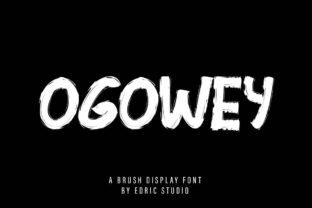
Ogowey is a casual, fun, and slightly quirky handwritten font, created with a brush pen. Its clean yet playful style makes it an excellent choice for web designers, UI designers, and digital product creators looking to add a unique touch to their projects.
Visual Characteristics and Personality
Ogowey's handwritten style brings a personal, human touch to any design. The slightly irregular strokes and natural flow of the letters give it a relaxed, approachable feel. This font is perfect for creating a warm, friendly, and creative atmosphere on your website or digital product.
Perfect for Creative and Brand-Focused Designs
Ogowey is ideal for a variety of web design elements, including:
- Website Headers and Hero Sections: Use Ogowey for eye-catching headlines that grab attention and set the tone for the rest of the page.
- Landing Pages and Call-to-Action Areas: Incorporate Ogowey in CTA buttons and short, impactful phrases to encourage user engagement and conversions.
- Online Shop Banners and Product Descriptions: Add a personal, handcrafted feel to your online store with Ogowey, making your products stand out and feel more authentic.
- Blog Graphics and Social Media Posts: Enhance your blog headers and social media graphics with Ogowey to create a cohesive and visually appealing brand identity.
- Course Pages and Portfolio Sites: Use Ogowey for titles and headings to add a creative, professional touch to your educational content or portfolio presentations.
Readability and Visual Hierarchy
While Ogowey is a decorative display font, it maintains good readability when used in moderation. Here are some tips to ensure optimal readability:
- Use for Short Phrases and Headings: Ogowey works best for short, impactful text like headlines, subheadings, and callouts. Avoid using it for long paragraphs or body text.
- Font Size and Spacing: Ensure adequate font size and letter spacing to maintain clarity, especially on mobile screens. A minimum font size of 18-20 points is recommended for headings.
- Color and Background: Use high-contrast colors against light and dark backgrounds. For image overlays, consider adding a subtle shadow or outline to enhance legibility.
Effective Font Pairing for Web Design
To create a balanced and professional look, pair Ogowey with simpler, more readable fonts. Here are some effective combinations:
- Sans Serif Fonts: Pair Ogowey with a clean, modern sans serif like Arial, Helvetica, or Roboto for body text. This combination provides a strong contrast and enhances readability.
- Serif Fonts: For a more editorial and sophisticated look, use a serif font like Georgia or Times New Roman for body text. This pairing adds a touch of elegance and professionalism.
Practical Considerations for Web Use
When using Ogowey in your web designs, keep these practical considerations in mind:
- Included Styles and Weights: Check the available styles and weights to ensure you have the right variations for your project. Ogowey may come with different weights and alternates to provide flexibility.
- Webfont Availability: Verify that Ogowey is available as a webfont and can be easily integrated into your website. Look for WOFF and WOFF2 formats for better performance.
- Multilingual Support: If your audience includes non-English speakers, check if Ogowey supports the necessary character sets and languages.
Commercial Licensing and Usage
Before using Ogowey in commercial projects, such as client websites, online stores, or digital templates, ensure you have the appropriate licensing. Commercial font licenses typically cover usage in multiple projects and can be purchased from reputable font marketplaces or directly from the font creator.
By incorporating Ogowey into your web design, you can create a distinctive and memorable brand identity that resonates with your audience. Whether you're designing a creative portfolio, a boutique online store, or a coaching website, Ogowey offers the perfect blend of personality and professionalism to elevate your digital presence.